Agent Control Plane — Studio Web Guide
Studio 웹 가이드 (agent-control-plane)
agent-control-plane is the open-source control plane for sideseat. Agents reach the stack through WORKER_BASE_URL and the tool registry—not the DB directly—and Studio is where you edit Object·Link·Action graphs and workflows. Paths and env follow the repo README.
On this page
Repository & runtime stack
Studio view
A typical visual IDE layout.
- Left: sideseat CONTROL PLANE navigation
- Center: dot-grid canvas
- Right: per-node properties panel
The top bar lines up OPEN, NAME, Save / Execute / Demo / Delete, export (.export.json, .workflow.xml), and the API Bearer token field.
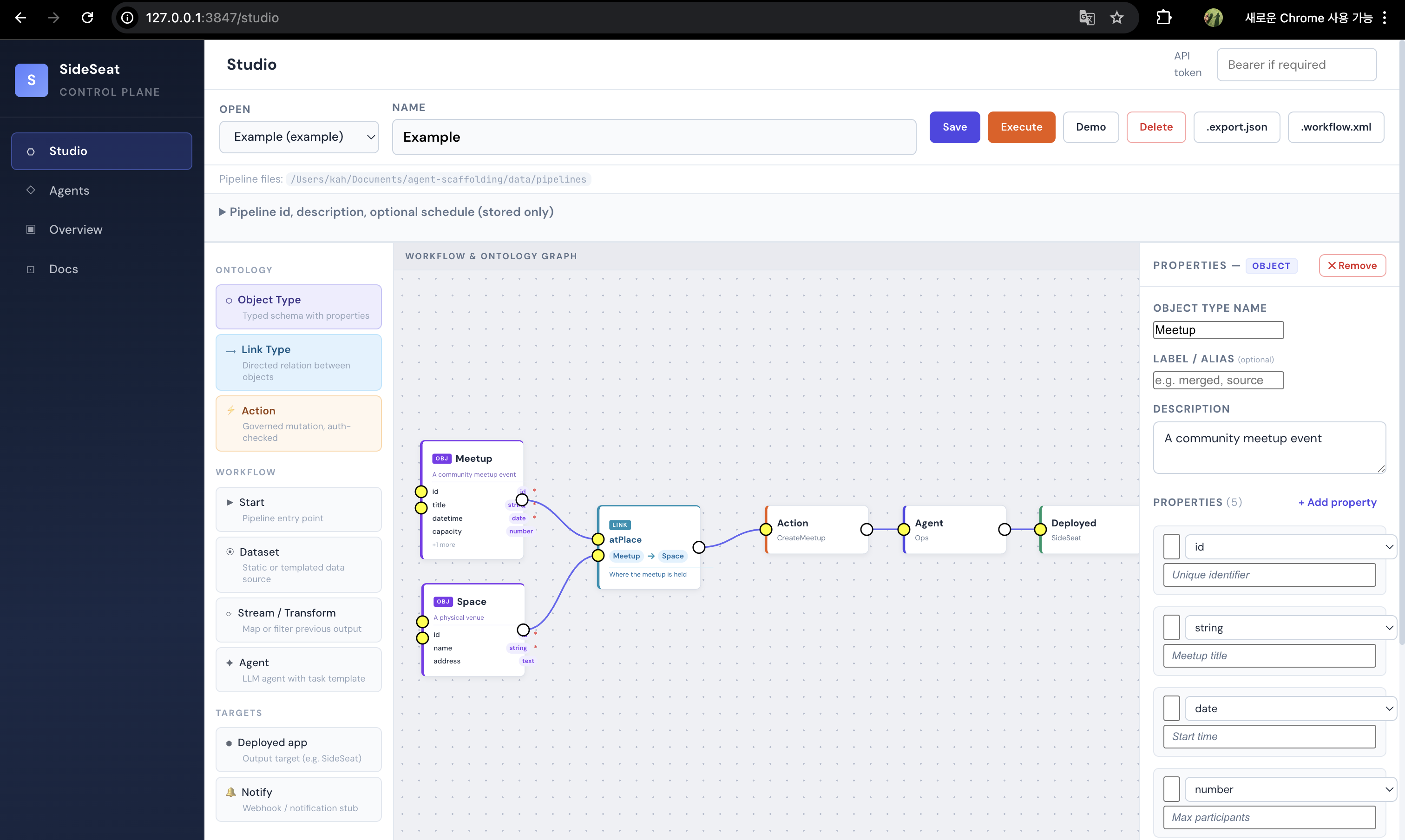
Local dev. Object·Link·Action and workflow on one canvas.
The center graph is a Meetup-creation example.
- Purple Object nodes:
Meetup,Space - Blue Link:
atPlace - Yellow Action:
CreateMeetup - Agent node
- Green Deployed target:
sideseat
The right panel edits the selected Object’s type, description, and properties (id, title, time, capacity, etc.).
Layout · UI tour
Layout
| Area | Role |
|---|---|
| Studio | platform-web — node editor, ontology·workflow visualization, save/run/demo/export |
| Worker / API | Execution, tools, policy; connect via WORKER_BASE_URL, etc. |
| Ontology | Object Type / Link Type / Action — schema, relations, governed mutations |
| Docker | Role-based runtime/deploy split (ops / backend / support) |
Studio UI tour
Left navigation
- Studio — this editor
- Agents — configured LLM agents (UI may vary by version)
- Overview — dashboard
- Docs — docs entry
Palette
| Section | Nodes | Role |
|---|---|---|
| ONTOLOGY | Object Type, Link Type, Action | Schema, relations, governed changes |
| WORKFLOW | Start, Dataset, Stream / Transform, Agent | Pipeline + LLM blocks |
| TARGETS | Deployed app, Notify | Deploy targets, webhooks |
Canvas & properties
Connect nodes with edges. The properties panel edits metadata for the selection (PROPERTIES — OBJECT, etc.).
Local run · architecture · wrap-up
Local run
git clone https://github.com/calicorone/agent-control-plane.git
cd agent-control-plane
cp .env.example .env   # WORKER_BASE_URL, etc.
npm install
Run the platform UI per README (e.g. npm run platform → http://localhost:3010). For Vite HMR, use PLATFORM_API_ONLY=1 npm run platform plus cd platform-web && npm run dev in a second terminal. Ports and scripts: README and docs/LOCAL_SETUP.md.
Architecture in brief
Studio          → edit graph·schema·workflow contracts
Worker / models → run Think → Act → Observe
Shared language → Object · Link · Action (see ontology essay)
Stack (short): TypeScript, React, Vite (front end); Node.js, Docker (runtime/deploy); Ollama, Anthropic, etc. per repo config.
Dev notes
- Run
npm installafter clone. - JSON / workflow XML exports help move graphs across environments.
- Bearer token: remote Worker or protected APIs only.
- Screenshot:
static/images/agent-homepage.png(legacy filename).
References
- AI Agent Scaffolding & Ontology (KO)
- Similar walkthrough: hibiki GPT-2 124M web guide (KO)
In one line
Wire a graph end-to-end, then Execute or export and align with Worker logs—that maps the loop to code and UI fastest.